


Gaming guide
A phone overheating while gaming is almost unavoidable during long PUBG, Free Fire or COD Mobile sessions, especially in a Pakistani summer. Games push the processor and graphics chip to their limits, and the heat has nowhere to go inside a slim phone. When it gets too hot, your phone protects itself by slowing down, which shows up as lag, frame drops and a dimmer screen. The good news: you can reduce heat a lot with simple changes.
20–30 minwhen heat often starts
10ways to cool down
62–105mmphone width the MEMO CX07 fits
In this guide
🔥
Heat makes phones slow down on purpose (throttling).
🔌
Gaming while charging creates the most heat.
🌬️
Airflow on the back helps a lot.
01Why phones overheat during games
🧠
Processor at full power
Fast games keep the chip running at high speed for long periods, producing constant heat.
Main cause🔆
Bright screen
High brightness and high refresh rates add heat and drain the battery.
Screen🔌
Charging at the same time
Charging produces heat in the battery while the processor heats the rest of the phone.
Double heat☀️
Hot room and thick case
Summer temperatures and thick cases stop heat escaping.
Environment02Why it matters
- Throttling: when hot, the phone lowers performance, so frame rates drop mid-match.
- Battery ageing: lithium batteries age faster when they are regularly hot.
- Screen dimming and warnings: many phones dim the screen or pause charging when too warm.
- Comfort: a hot phone is uncomfortable to hold for long sessions.
0310 ways to stop your phone overheating while gaming
1. Remove the case while gaming
Thick, rubber or leather cases trap heat. Take it off for long sessions.
2. Do not game while charging
This is the biggest single cause of heat. Charge before playing, or take a short break to charge.
3. Lower graphics settings
Drop from the highest graphics preset to a balanced one. You often keep the same frame rate with much less heat.
4. Reduce brightness
Lower brightness slightly, or play in a shaded spot so you do not need maximum brightness.
5. Close background apps
Apps running in the background add load. Close them before you start.
6. Use a magnetic cooling fan
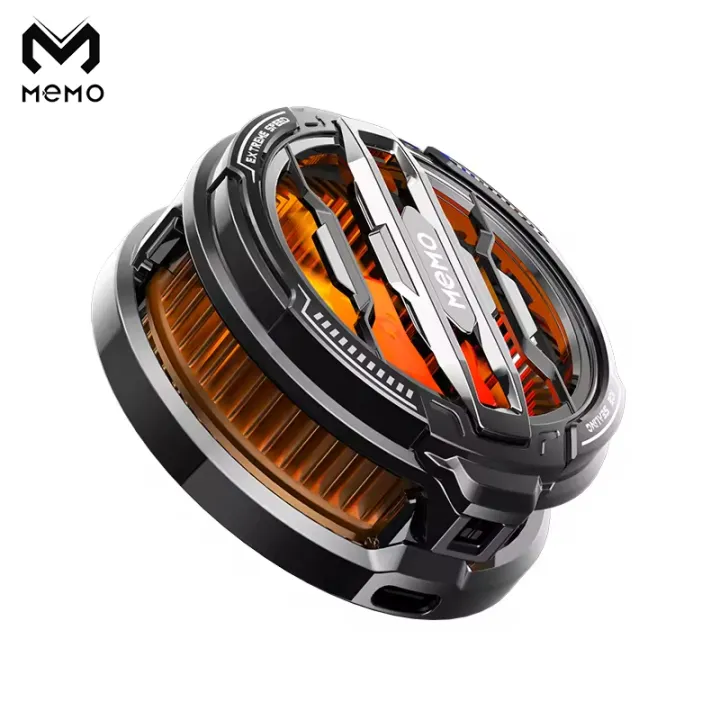
A cooler blows air across the back of your phone. The MEMO CX07 attaches with a full magnet ring, has a low-noise spiral air duct and fits phones 62–105mm wide. Place it near the processor, usually the top half of the phone’s back.
7. Play in a cooler place
Avoid direct sun, closed cars and hot rooms. A fan or air-conditioned room helps.
8. Take short breaks
A few minutes between matches lets the phone cool down.
9. Keep the phone updated
Game and system updates often improve performance and heat management.
10. Use wired audio
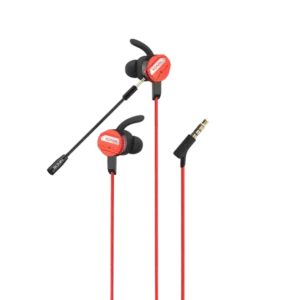
Bluetooth adds a little load. A wired gaming handsfree like the Ronin R-007 Gamerz also gives zero audio delay. See gaming earbuds guide.
💡
Power the cooler separately. Run the cooling fan from a wall adapter or a power bank during long sessions so it can run at full speed without draining your phone.
04Does a phone cooler really help?
A cooler does not stop heat completely, but airflow over the back of the phone helps it shed heat faster, so it stays cooler for longer and throttles less. Magnetic coolers like the MEMO CX07 are easy to attach without clamps pressing on buttons. If your phone does not have built-in magnets, stick a metal ring plate to the back of the phone or case so the fan can hold on.
Without a cooler
- Heat builds up over the match
- More throttling and frame drops
- Phone hot to hold
VS
With a cooler
- Heat removed faster
- Steadier performance for longer
- More comfortable grip
⚠️
Never put your phone in a fridge or freezer. Sudden cold can cause condensation inside the phone, which can damage it. Cool it gradually in the shade instead.
CaseOff for long sessions
ChargingNot while playing
GraphicsBalanced, not max
BrightnessA little lower
CoolerPlaced near the processor
BreaksBetween matches
Why hot phones slow down is explained in the dynamic frequency scaling article on Wikipedia.
Key takeaway
A phone overheating while gaming is caused mostly by a hard-working processor, high brightness and charging while playing. Remove the case, avoid charging during games, lower settings and use a magnetic cooler for long sessions.
🛒Shop the products in this guide
-
Mobile Gaming Accessories
MEMO CX07 Magnetic Phone Cooling Fan with RGB
Original price was: ₨ 3,999.₨ 3,499Current price is: ₨ 3,499. Add to cart -
Earbuds
Ronin Eminence R-7050 ANC Gaming Earbuds
Original price was: ₨ 7,595.₨ 5,399Current price is: ₨ 5,399. Read more -
Power Banks
Ronin Neutron R-4030 10000mAh Power Bank (22.5W)
Original price was: ₨ 6,595.₨ 5,999Current price is: ₨ 5,999. Read more -
Handsfree & Neckbands
Ronin R-007 Gamerz Handsfree (3.5mm + Type-C)
Original price was: ₨ 2,295.₨ 1,999Current price is: ₨ 1,999. Add to cart
05Frequently asked questions
Is it dangerous if my phone gets hot while gaming?
Warm is normal. Very hot is not good for the battery, and phones will slow down or warn you. Stop and let it cool if it becomes uncomfortable to hold.
Does a cooling fan really work?
It cannot stop heat completely, but airflow helps the phone stay cooler for longer and throttle less.
Should I game while charging?
It is better not to. Charging and gaming together create the most heat.
Will the MEMO CX07 fit my phone?
It fits phones from 62mm to 105mm wide. Without built-in magnets, use a metal ring plate on the back.

Device Care & Maintenance

Why Is My Phone Charging Slowly? 10 Causes and Simple Fixes
From lint in the port to the wrong charger, here are the most common reasons a phone charges slowly and how to fix each one in minutes.

Device Care & Maintenance
One Earbud Not Working? How to Fix Left or Right Earbud Problems
Only the left or right earbud playing? Most cases are fixed in minutes with these steps, from cleaning the charging contacts to a full reset.

Mobile Accessories
Power Banks With Built-in Cables: Pros, Cons and Who Should Buy One
Built-in cables mean no more forgotten wires, but they come with trade-offs. Here is how they compare with separate cables, and who they suit best.