




Buyer’s guide
A power bank with built-in cables solves one of the most annoying problems with portable charging: you have the power bank, but you left the cable at home. They are popular in Pakistan because one unit can charge Android phones and iPhones in the same family. But built-in cables also have trade-offs in speed and durability, so it is worth knowing them before you buy.
0extra wires to carry
3–4cable types in one unit
1part that can wear out first
In this guide
🔌
Built-in cables usually cover Type-C, Lightning and Micro USB.
⚡
Many budget models charge at standard 2A speed.
🧳
Short cables mean the phone sits close to the bank.
01How built-in cable power banks work
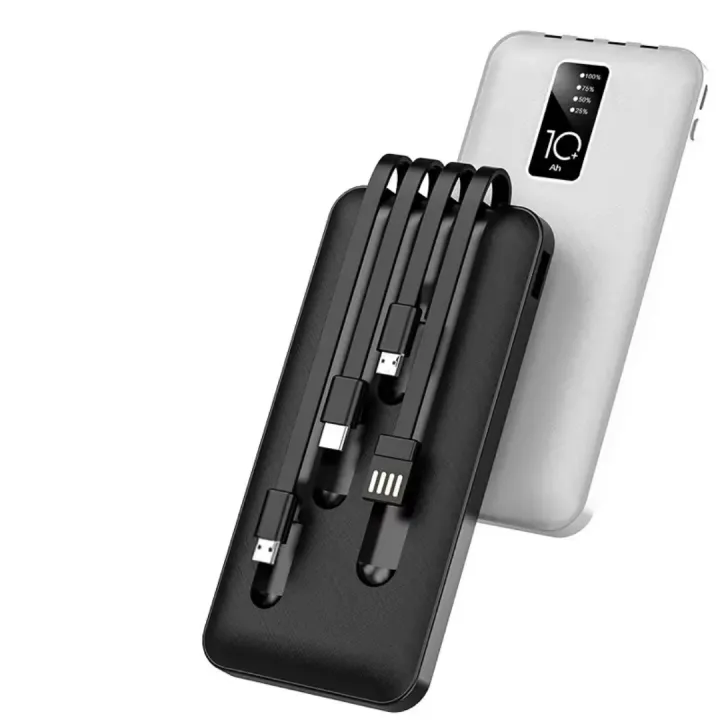
Instead of a USB port that you plug your own cable into, these power banks have short cables attached to the body. Typically there is a Type-C lead for most Android phones, a Lightning lead for iPhone 14 and older, and sometimes a Micro USB lead for older phones, speakers and torches. Some also keep normal USB ports so you can use your own cable when you need to.
🔋
J-Cell J-122
10,000mAh with built-in Micro USB, Type-C and Lightning cables plus an LED display. A slim everyday option. See the J-122.
10,000mAh🔋
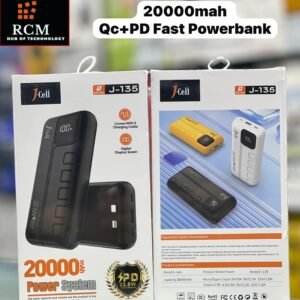
J-Cell J-135
20,000mAh with the same three built-in cables and pass-through charging. Better for families and travel. See the J-135.
20,000mAh⚡
J-Cell J-102
10,000mAh with a 4-in-1 built-in cable set, PD 66W two-way fast charging and a transparent shell. See the J-102.
Fast charging🔋
Ronin R-4030
10,000mAh with built-in cables, up to 22.5W on the Type-C cable and a rated 6,400mAh at 5V. See the R-4030.
22.5W02Advantages of a power bank with built-in cables
- You never forget the cable. This is the main reason people buy them.
- One power bank for the whole family. Android and iPhone users can share it without swapping wires.
- Less clutter in your bag. No tangled cables at the bottom of a backpack.
- Handy for riders and delivery workers. You can charge quickly at a stop without searching for a lead.
- Some still have ports, so you can use a longer or faster cable when needed.
03The disadvantages
- The cables are short. You usually need to hold the phone and the power bank together.
- If a cable breaks, you cannot simply replace it. The rest of the power bank may still work through its ports, but the convenience is gone.
- Speed can be lower. Many budget built-in cable models charge at 5V/2A. If you want fast charging, check the specs carefully.
- Slightly bulkier. The cable housings add a little size.
Choose built-in cables if
- You often forget cables
- Several people share one power bank
- You want simple, standard-speed charging
- You charge in short stops
VS
Choose separate cables if
- You want the fastest possible charging
- You need a longer cable
- You are rough with your gear
- You already carry a good cable
04How to make built-in cables last longer
Most failures happen at the point where the cable meets the plug. A few habits help a lot:
- Pull the plug, not the wire, when you disconnect.
- Tuck the cables back into their slots after use instead of leaving them bent.
- Do not wrap them tightly around the power bank.
- Keep the connectors clean. Dust in a Type-C or Lightning tip can stop charging.
💡
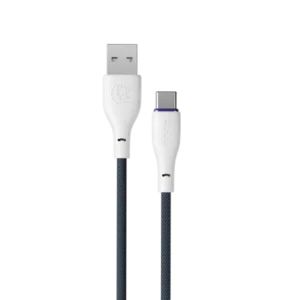
Carry one spare cable anyway. If a built-in lead fails on a trip, a braided cable like the Ronin R-2025 Type-C cable keeps you charging through the power bank’s USB port.
05What about charging speed?
Built-in cables are not automatically slow, but the cheapest models often are. Look for the output figure. “5V/2A” means standard charging, about 10W. A figure like “22.5W” or “PD” means faster charging, as long as your phone supports the same standard. Our fast charging guide explains what these numbers mean.
10WStandard (5V/2A)
20–22.5WFast
66WOnly if phone supports it
For general background, see the power bank article on Wikipedia.
Key takeaway
A power bank with built-in cables is the most convenient choice for families, students and riders who hate carrying wires. If speed matters most, choose a model with PD or 22.5W output, and still keep one spare cable in your bag.
🛒Shop the products in this guide
-
Power Banks
J-Cell J-102 10000mAh Transparent Power Bank (PD 66W, 4-in-1 Cable)
Original price was: ₨ 3,399.₨ 2,799Current price is: ₨ 2,799. Add to cart -
Power Banks
J-Cell J-135 20000mAh Power Bank with Built-in Cables
Original price was: ₨ 4,999.₨ 4,499Current price is: ₨ 4,499. Read more -
Chargers & Cables
Ronin Flexin R-2025 Type-C Cable (3A Fast Charging)
Original price was: ₨ 1,135.₨ 795Current price is: ₨ 795. Add to cart -
Power Banks
Ronin Neutron R-4030 10000mAh Power Bank (22.5W)
Original price was: ₨ 6,595.₨ 5,999Current price is: ₨ 5,999. Read more
06Frequently asked questions
Do built-in cable power banks charge iPhones?
Yes, if they include a Lightning cable for iPhone 14 and older, or a Type-C cable for iPhone 15 and newer.
Are built-in cables slower than separate cables?
Not always, but many budget models are limited to 2A. Check for PD or a watt figure such as 22.5W if you want fast charging.
What happens if a built-in cable breaks?
It cannot easily be replaced, but you can usually still charge through the power bank’s USB or Type-C port with your own cable.
Can I charge several phones at once?
Many models can, but the total output is shared, so each phone charges more slowly.

Mobile Accessories

Neckband vs Earbuds: Which Is Better for You?
Neckbands last longer and are hard to lose; earbuds are compact and stylish. Here is how they compare for commuters, riders, students and gym users.
Device Care & Maintenance
Why Is My Phone Charging Slowly? 10 Causes and Simple Fixes
From lint in the port to the wrong charger, here are the most common reasons a phone charges slowly and how to fix each one in minutes.

Device Care & Maintenance
One Earbud Not Working? How to Fix Left or Right Earbud Problems
Only the left or right earbud playing? Most cases are fixed in minutes with these steps, from cleaning the charging contacts to a full reset.